AI Trading Assistant & Ledger · SPX 0DTE

Every tool watches the market.Kassia watches your trading.

She reads the regime like the flow tools do, then goes where they don't: your open positions, your real fills, and the rulebook the desk trades, held to on every session.

A desktop platform, built for people who trade SPX 0DTE seriously.

Published every trading day on The Desk Report →

She doesn't place trades. She doesn't sell signals. She doesn't give advice. Kassia is the intelligence layer between you and a rushed decision.

What she does

In 0DTE, discipline is the edge.

One layer, with you at the bell, through the session, and after the close. Watch her work.

01 · THE SESSION

She reads the tape all day.

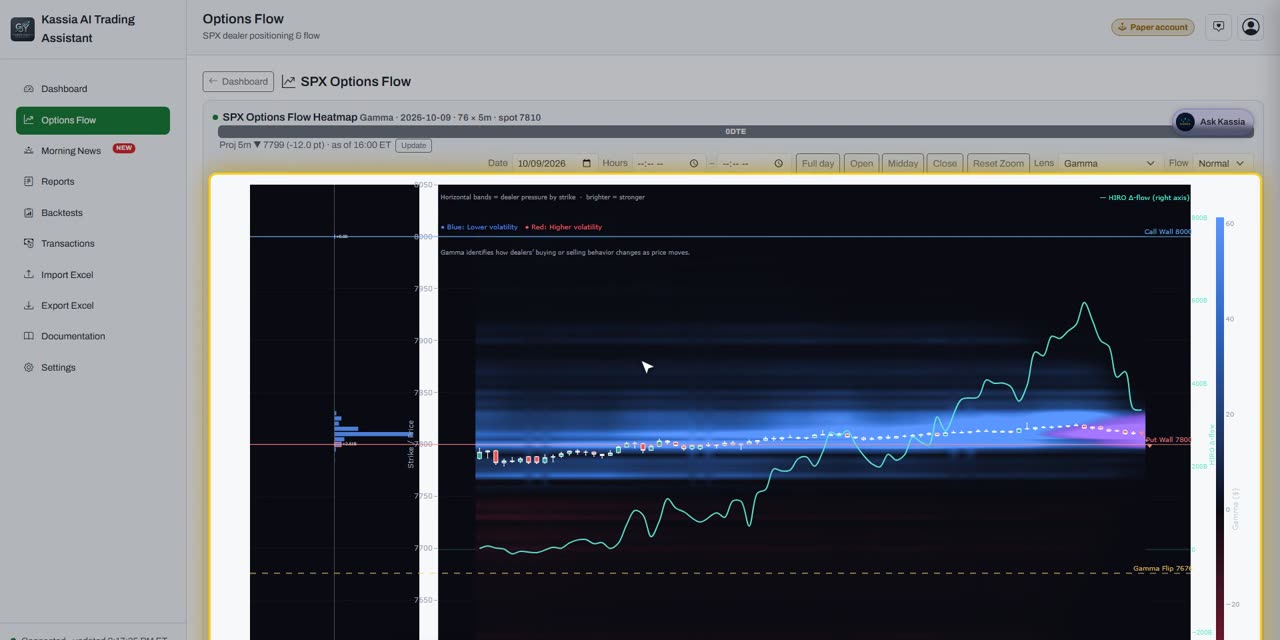
Gamma, delta pressure, delta decay, the call and put walls, and the gamma flip, in one live picture: where price is pinned, and where it can run.

She watches your positions, not just the tape.
kassiaThe Tapelive

Where dealers are pinned and where price can run

02 · ASK HER

Ask her what it means.

She reads the same surface you're looking at, the regime, the levels, your open spreads, and answers in plain English.

Ask Kassia about the tape, the levels, or your open positions…""
kassiaAsk herlive

She answers from the live tape, in plain English

kassiaReports

Every session logged and graded, automatically

03 · THE CLOSE

Every trade, logged for you.

Trades sync straight from your broker the moment they're done. Kassia keeps the running history, wins and losses alike, and tells you where you missed your rules.

One real SPX session, end to end

2 yrsThe desk's own trading
5 yrsSPX + VIX backtested
ThousandsOf simulated paths
Every tradeAuto logged

See it before you sign up

The desk publishes every trading day.

Watch Kassia read the tape and hold the rules on real SPX 0DTE sessions: wins, losses, and no trade days alike, before you ever create an account.

Watch The Desk Report →

Every rule she enforces is grounded in two years of the desk's own trading and stress tested against five years of SPX and VIX history and thousands of simulated paths. Modeled results, not real trades.

kassiaThe Desk Report

Watch the daily Desk Report recaps

Kassia Academy

Learn the platform before it opens.

Short videos walk through every part of Kassia: the morning report, options flow, the SPX chart, sample trades on a paper account, the journal, post-market reports, backtesting and the chat. Free, and no sign-up needed.

Start the Academy →
kassiaKassia Academy

Short narrated sessions, at your own pace

Questions

Is this financial advice?

No. Kassia is an analytics tool for informational and educational use. She doesn't place trades, sell signals, or give advice.

Does she trade for me?

No. She reads the tape and holds the rulebook. You place every trade yourself.

How do I get started?

Open your account below. You answer a short application and sign the Kassia agreements, and approved accounts start a 7-day free trial with no card needed. Members of the early-access list join the free Private Preview instead. See plans & pricing.

Can I see it before I open an account?

Yes. The Kassia Academy walks through every part of the platform in short videos. It's free, and you don't need to sign up.

Is my data safe?

Your account connects read only through TastyTrade. Kassia never places or moves anything.

Open Account

Open your Kassia account.

Open your account with a short application. Approved accounts start a 7-day free trial of Kassia AI Trading Assistant, no card needed.

OPEN ACCOUNT

Joined the early-access list at kassia.ai? Use the same email address and you join the free Private Preview instead.

or continue with email

We email you a one-time code to confirm the address. No password to remember.

Already have an account? Log in

On the early-access list but haven’t confirmed your email?

Open account

Almost there

Enter your key.

We sent a 6-digit key to your inbox. Type it here to confirm your place.

Can’t find it? Check your Junk or Spam folder.A first email from a new sender often lands there. Look for support@kassia.ai, and mark it “Not junk” so our next email reaches your inbox.

Each new key replaces the last one, so always use the newest email.